---
description: Request Screen Recordings from customers.
---
# Overview
Birdie is designed to help support agents understand and resolve customer issues faster by requesting screen recordings directly from customers. Instead of relying on lengthy back-and-forth exchanges, agents can see exactly what’s happening on the customer’s screen—streamlining communication and improving resolution times.
## Why Request Screen Recordings with Birdie?
Birdie is particularly helpful in two scenarios:
1. **Communication Gaps**: When customers struggle to describe their issues clearly.
2. **Complex Issues**: When resolving the issue requires detailed visual context.
By allowing customers to visually share their experience, Birdie reduces misunderstandings and enables agents to take action with confidence.
***
## Integration with Your Helpdesk
The most popular way to use Birdie is by integrating it directly into your helpdesk. Birdie works seamlessly with platforms like **Zendesk, Intercom, Freshdesk, and more**. Each integration is tailored to fit the unique workflows of the helpdesk, ensuring that Birdie feels like a natural part of your support process.
> **Note:** The way Birdie works may vary depending on your helpdesk. Be sure to [**visit the appropriate Helpdesk Documentation**](installation/helpdesk-integrations) for full details on setup and capabilities.
***
## How Does Birdie Work?
Birdie makes requesting recordings simple and efficient:
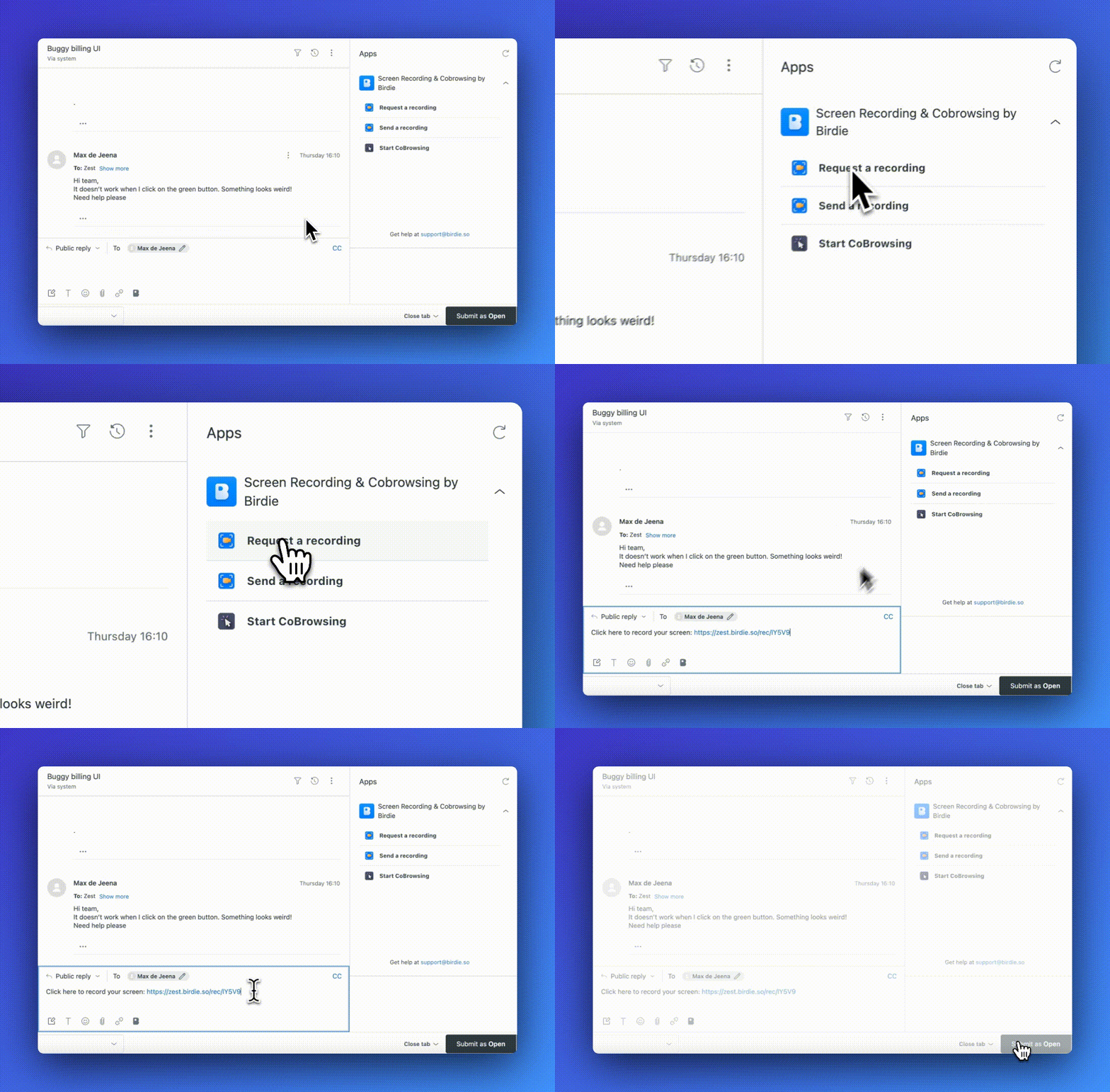
* **Request Recordings**: Agents can ask customers to record their screens directly from the helpdesk.
Request screen recordings from customers
* **Effortless for Customers**: Customers can easily record their screens without needing to download or install anything.
Then, the customer records their screen for the agent to watch.
* **Gain Full Context**: Recordings include session and device metadata by default, and Birdie can also [capture console logs and network activity](devtools-console-logs-and-network-requests).
Once the recording is submitted:
1. Agents can review the video to better understand the issue.
2. If needed, the recording can be escalated to Level 2 support or engineers for further investigation.
## Helpdesk
Discover how the Screen Recording integrates seamlessly with your helpdesk:\
Birdie offers a native integration with the following helpdesks:
{% content-ref url="../helpdesk/zendesk" %}
[zendesk](../helpdesk/zendesk)
{% endcontent-ref %}
{% content-ref url="../helpdesk/intercom" %}
[intercom](../helpdesk/intercom)
{% endcontent-ref %}
{% content-ref url="../helpdesk/freshdesk" %}
[freshdesk](../helpdesk/freshdesk)
{% endcontent-ref %}
{% content-ref url="../helpdesk/freshchat" %}
[freshchat](../helpdesk/freshchat)
{% endcontent-ref %}
{% content-ref url="../helpdesk/salesforce-service-cloud" %}
[salesforce-service-cloud](../helpdesk/salesforce-service-cloud)
{% endcontent-ref %}
{% content-ref url="../helpdesk/jira-service-management" %}
[jira-service-management](../helpdesk/jira-service-management)
{% endcontent-ref %}
{% content-ref url="../helpdesk/help-scout" %}
[help-scout](../helpdesk/help-scout)
{% endcontent-ref %}
{% content-ref url="../helpdesk/others/happyfox" %}
[happyfox](../helpdesk/others/happyfox)
{% endcontent-ref %}
{% content-ref url="../helpdesk/others/ada" %}
[ada](../helpdesk/others/ada)
{% endcontent-ref %}
{% content-ref url="../helpdesk/others/forethought" %}
[forethought](../helpdesk/others/forethought)
{% endcontent-ref %}
{% hint style="info" %}
If your helpdesk isn't listed, don't worry—Birdie integrates with all other helpdesks. \
[Contact us](https://birdie.so/help) with your helpdesk name, and we'll provide you with specific setup instructions.
{% endhint %}
## Standalone
Birdie can be used as a standalone tool, letting you request recordings through email, Zoom chat, or wherever else you need it.
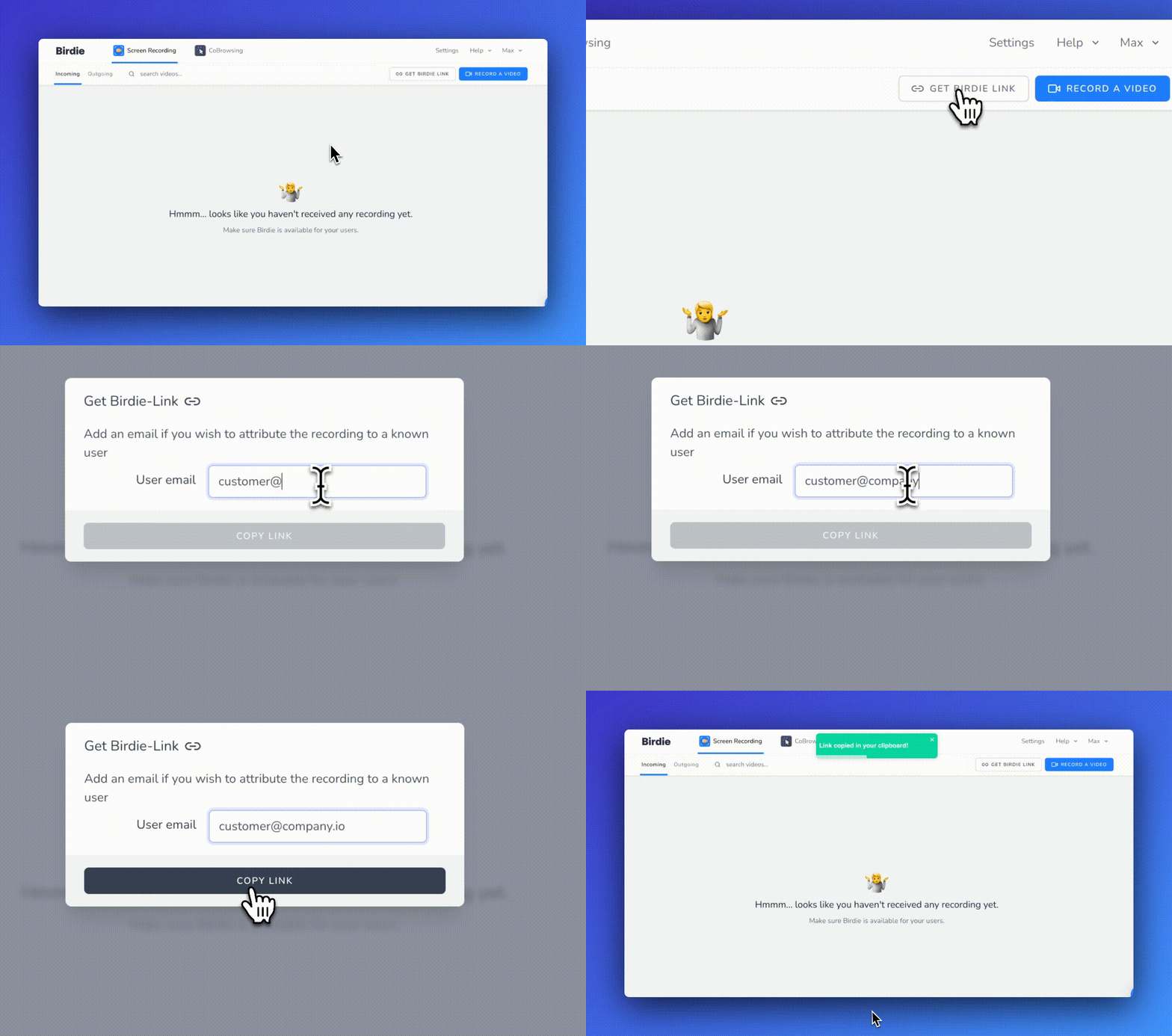
#### Generate a Birdie Standalone Link
Generate a Birdie standalone link
Should I enter the customer email before generating a link?
If you add your customer's email address, Birdie will be able to automatically link the future recording to the customer.
{% hint style="success" %}
If you need help or have a question, contact us at [support@birdie.so](mailto:support@birdie.so)
{% endhint %}