> For the complete documentation index, see [llms.txt](https://docs.birdie.so/birdie-docs/llms.txt). Markdown versions of documentation pages are available by appending `.md` to page URLs; this page is available as [Markdown](https://docs.birdie.so/birdie-docs/request-screen-recordings/installation/helpdesk-integrations.md).
# Helpdesk Integrations
Which Helpdesk are you using?
{% hint style="info" %}
If your helpdesk isn't listed, don't worry—Birdie integrates with all other helpdesks. \
[Contact us](https://birdie.so/help) with your helpdesk name, and we'll provide you with specific setup instructions.
{% endhint %}
## Helpdesks
\
Birdie offers a native integration with the following helpdesks:
{% content-ref url="/pages/AwZKvCvyhjj90fmgQ7pk" %}
[Broken mention](broken://pages/AwZKvCvyhjj90fmgQ7pk)
{% endcontent-ref %}
{% content-ref url="/pages/hionAsS6C3rTd2OVwczQ" %}
[Crisp](/birdie-docs/helpdesk/crisp.md)
{% endcontent-ref %}
{% content-ref url="/pages/yA8yG68QTSd89WfMC4kW" %}
[Forethought](/birdie-docs/helpdesk/others/forethought.md)
{% endcontent-ref %}
{% content-ref url="/pages/v1H1wlHLTpyzg4juhInS" %}
[Freshchat](/birdie-docs/helpdesk/freshchat.md)
{% endcontent-ref %}
{% content-ref url="/pages/Q80o4v3e8hS2bLWtkDcs" %}
[Freshdesk](/birdie-docs/helpdesk/freshdesk.md)
{% endcontent-ref %}
{% content-ref url="/pages/zJpazbZmArJLjHLm2w7G" %}
[Front](/birdie-docs/helpdesk/front.md)
{% endcontent-ref %}
{% content-ref url="/pages/vMjokljjDBTB8QqZwe5t" %}
[Happyfox](/birdie-docs/helpdesk/others/happyfox.md)
{% endcontent-ref %}
{% content-ref url="/pages/k4A5juKlsqWCmGrY1qKP" %}
[Help Scout](/birdie-docs/helpdesk/help-scout.md)
{% endcontent-ref %}
{% content-ref url="/pages/HbCMzep5vU3eJeEsWNpT" %}
[Intercom](/birdie-docs/helpdesk/intercom.md)
{% endcontent-ref %}
{% content-ref url="/pages/HrwtiQpQotG9cmHTIN3m" %}
[Jira Service Management](/birdie-docs/helpdesk/jira-service-management.md)
{% endcontent-ref %}
{% content-ref url="/pages/inCBIKs6P68O1uYykeI4" %}
[Plain](/birdie-docs/helpdesk/plain.md)
{% endcontent-ref %}
{% content-ref url="/pages/MdQLYL8Ti8jPuwUM4K7l" %}
[Pylon](/birdie-docs/helpdesk/pylon.md)
{% endcontent-ref %}
{% content-ref url="/pages/TANzWVDt9Yh1CGGM8LyV" %}
[Salesforce Service Cloud](/birdie-docs/helpdesk/salesforce-service-cloud.md)
{% endcontent-ref %}
{% content-ref url="/pages/jYS12nNjgXjbOvueyA6d" %}
[Zendesk](/birdie-docs/helpdesk/zendesk.md)
{% endcontent-ref %}
## Standalone
Birdie can be used as a standalone tool, letting you request recordings through email, Zoom chat, or wherever else you need it.
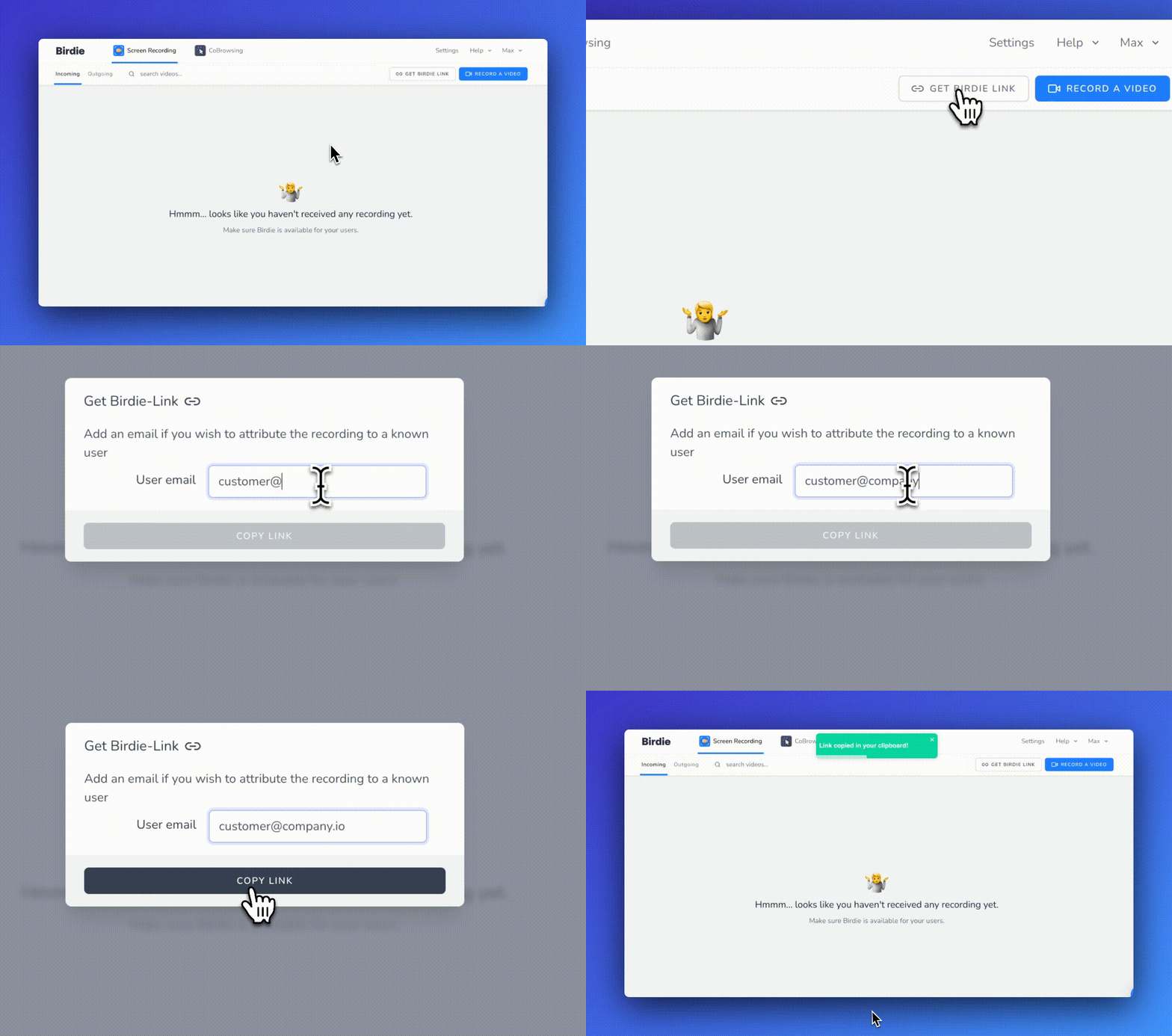
To do so, generate a Birdie Standalone Link [from your Birdie workspace](https://app.birdie.so/library/inbox) as shown below:
Generate a Birdie standalone link
Should I enter the customer email before generating a link?
If you add your customer's email address, Birdie will be able to automatically link the future recording to the customer.
{% hint style="success" %}
If you need help or have a question, contact us at
{% endhint %}